
Disclosure Form
Capture every idea the way your patent committee needs it
AppColl's invention disclosure form is fully customizable, so you collect exactly the information your patent committee needs to make a quick filing decision on every idea. You choose the questions, how inventors answer them, and which ones are required.
Inventors add co-inventors, drag and drop supporting documents, and submit straight to the assigned attorney. Every save is captured as a PDF revision, so nothing gets lost along the way.
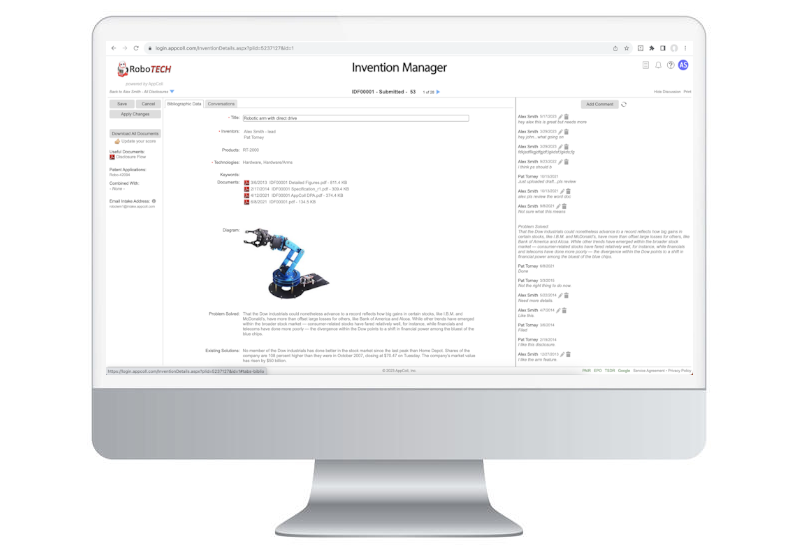
From idea to submitted disclosure
1
Name the idea
Inventors give the disclosure a title, and whoever creates it is added automatically as the first named inventor.
2
Add co-inventors
Search existing inventors or add a new one with a name and email. Co-inventors with a login can work on the disclosure together.
3
Answer and attach
Answer the committee's questions and drag in diagrams, presentations, white papers, code or audio files.
4
Submit for review
Submit with comments for the assigned attorney. If changes are needed, the attorney sends it back for rework and inventors are emailed.
Disclosure Form Features
01
Fully customizable questions
Write up to 48 questions in your own words, add general instructions for inventors, and reorder or remove questions at any time.
02
Six answer types
Text, date, text and date, image, drop-down and multi-select fields let inventors answer each question in the format that fits.
03
Required and conditional fields
Make questions always required, never required, or required only when a condition is met. Show a question only to the people who need it.
04
Disclosure tracking
Track disclosures by product line, technology and keyword. Create custom tags that fit your business, tag disclosures on the fly, and report on the data in seconds.
05
Automatic PDF and revisions
A PDF of the disclosure is generated when it is saved, and every later save is stored as a new revision, giving you a complete history.
06
Import existing disclosures
We can import your existing disclosures from any spreadsheet, so your whole invention history lives in one place.
Form settings your committee controls
Patent committee members set up the form from the Inventions tab. A few simple settings decide how inventors work with it.
Inventor roles
Set a first inventor and a lead inventor, and optionally require a contribution amount and date for each co-inventor.
Control new contacts
Decide whether inventors can add new people to your contacts, so your inventor list stays free of duplicates.
Required documents
Require at least one supporting document, such as lab notes, white papers, code or flow charts, before a disclosure can be submitted.
Committee and admin fields
Show custom fields to committee members or account admins only, and let admins edit a disclosure at any point in the flow.
More disclosure tools
Products, technologies & keywords
Predefine the lists inventors choose from, so every disclosure is categorized the same way for filtering and reporting.
Rework with comments
Attorneys can send a disclosure back with comments. Inventors get an email, make their changes and resubmit.
Status notifications
Email inventors and other parties automatically when a disclosure changes status or is waiting on their next action.
Manual status changes
Account admins can move one or many disclosures to a specific status, bypassing the normal flow when needed.