
Approval Flow
Your invention review process, built the way your committee works
Invention Manager™ supports your current approval workflow, simple or complex, with as many or as few steps and reviewers as you need. AppColl maps it into an easy-to-read, color-coded flow chart, so inventors can see exactly how their disclosure moves forward.
Start with our standard flow and be up and running within a day, or expand with unlimited steps and parties. Changes to the flow are made quickly, with no downtime.
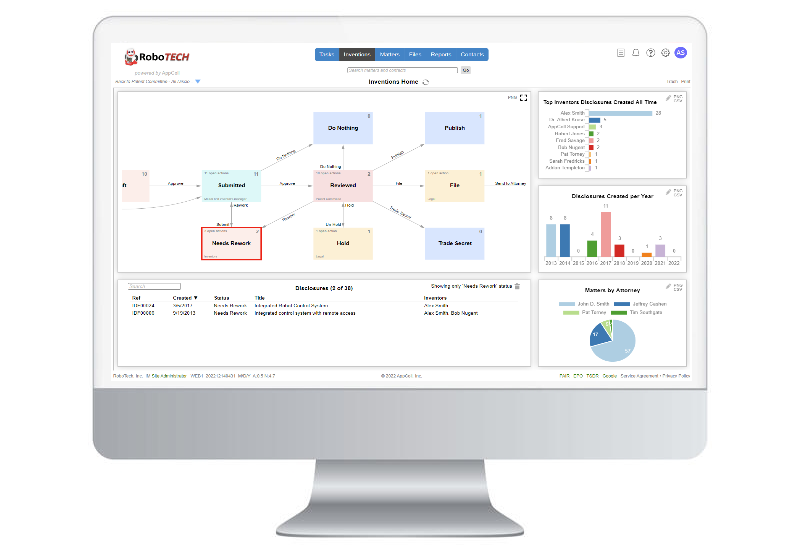
How a disclosure moves through the flow
1
Submit
An inventor submits the disclosure, and AppColl emails the people who own the next step.
2
Review
Reviewers, assigned by tag, picked for each disclosure, or based on who the inventor reports to, review and score the idea.
3
Decide
Your patent committee decides together in a review meeting, or members vote independently as a virtual committee.
4
Hand off to counsel
Approved ideas become an unfiled patent application, and the attorney or agent chosen to prosecute it is notified by email.
Approval Flow Features
01
Tailored to your process
We build your flow as a clear, color-coded chart. Use our standard flow to get started in a day, or add unlimited steps and parties.
02
Customized emails
Send automated emails at every step: to inventors when a status changes, to committee members when decisions are due, and to outside counsel when disclosures are ready to file.
03
In-person or virtual committees
Invention Manager works with committees that meet to decide on filings, and with virtual committees whose members vote independently.
04
Combine similar disclosures
Merge related disclosures into one, bringing all of their information together for approval as a single idea.
05
Simple reviewer decisions
Reviewers get a clean, simple screen to enter their decision on each idea, so disclosures keep moving.
06
Flexible disclosure forms
Create disclosure forms as simple or as detailed as you like, and add or remove questions in real time.
Clear roles at every step
Each step in your flow belongs to a role, so the right people see the right disclosures and act at the right time.
Committee members
Committee members make the decisions at committee steps and can see every disclosure, whatever their role in the company.
Legal
Attorneys, patent agents, and inside or outside counsel make the legal calls and assign approved disclosures for filing.
Reviewers
Reviewers are assigned by tag, selected for each disclosure, or set by your corporate hierarchy using each inventor's “reports into” contact.
Prosecuting attorney
The prosecuting attorney is chosen from your attorneys, agents and counsel when a disclosure is approved, and is notified automatically.
More approval tools
Status change emails
Notify all inventors, the lead inventor or the first inventor whenever a disclosure is submitted, reviewed or sent back for rework.
Action item emails
Each action, such as review, rework or decide, has its own email to the person who owns it.
Review meetings
Schedule committee meetings with a date, duration, presenter, the disclosures to discuss, and notes.
Manual status changes
Account admins can move one or many disclosures to a specific status when the normal flow needs a shortcut.