
Scoring
Rank every disclosure on the criteria that matter to you
Invention Manager™ lets you create as many attributes as you need for reviewers to rate on the disclosure scoring form. Attributes can be weighted to build an overall numeric score, or simply capture a qualitative opinion in plain text.
Ratings entered during review carry over automatically to the filed patent record, so you can use them throughout the patent lifecycle.
How scoring works
1
Set up the matrix
Start from AppColl's default scoring matrix and edit the questions, values and weights to fit your criteria.
2
Reviewers score
Inventors, reviewers, committee members and others give a score and comments for each question.
3
AppColl averages it
A weighted scoring average is calculated automatically, with less emphasis on lower-weighted questions.
4
Carry it forward
Scores move to the filed patent record to inform prosecution and annuity decisions later on.
Scoring Features
Custom disclosure scoring
Set up a scoring matrix with your own questions, numeric values and weighting, and easily see the scores from each scorer.
Weighted scores
Give each question a weight so your most important criteria count most in the overall score.
Flexible answer formats
Reviewers can score attributes with radio buttons, drop-downs or plain text.
Comment-only questions
Turn off numeric values for any question that only needs a written opinion.
Easy cost/benefit analysis
Use scores to assess a patent's value after filing and decide whether continued prosecution or annuity payments make sense.
Easy set-up
Inventors and disclosure reviewers can be up and running in seconds, with no lengthy training documents or videos.
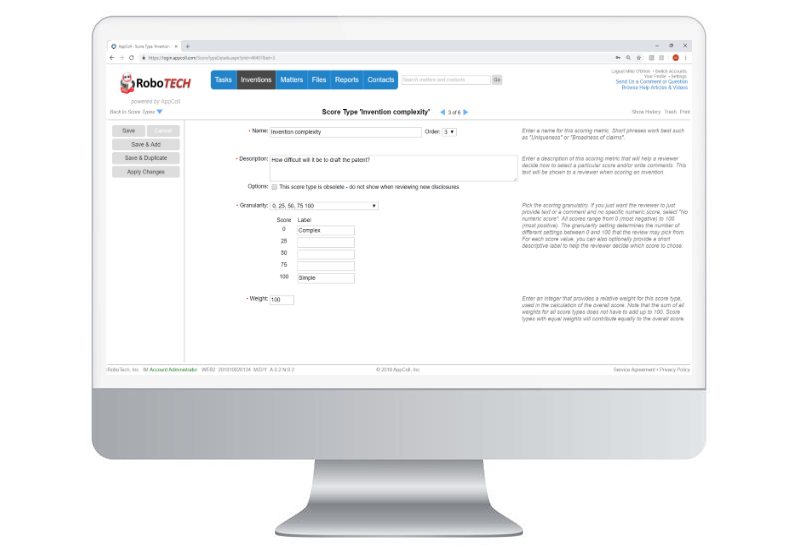
Each question, your way
Every question in the scoring matrix has its own settings, so you measure exactly what your committee cares about.
Name and description
Explain what reviewers should consider when scoring each question.
Granularity levels
Choose the scoring values, such as 0, 25, 50, 75 and 100, and describe what each value means.
Score weight
Set a weight below 100 to place less emphasis on a question in the scoring average.
Anonymous scores
Check one box to keep reviewers' scores anonymous.
More scoring tools
Transparent to inventors
Scoring averages are visible in the disclosure, giving inventors full transparency into how their idea was rated.
Scores per scorer
See each person's numeric scores for a disclosure at a glance.
Part of your approval flow
Scoring fits into your review step, so reviewers rate an idea as they review it.
Default matrix included
AppColl creates a default scoring matrix you can fully edit, so you never start from scratch.