
Prior Art
Every reference, tracked from first citation to IDS
The Prior Art module simplifies managing references. Simply enter a patent or publication number, and we will populate the details using Espacenet. You can also import existing prior art matrices or upload previously filed IDS forms. Automatically retrieve references from issued patents and available references from pending applications.
When adding a new case to a matter family, like a continuation or divisional, you can effortlessly cross-cite references from related matters with just a checkbox—AppColl® handles the rest. Generate a cross-citation matrix to quickly review which references have been cited across members of a patent family.
From reference to IDS
1
Add references
Type a patent or publication number and AppColl pulls the details from Espacenet. For published and issued US and foreign matters, click a button to import their references, or bring in pending references from a spreadsheet.
2
Cross-cite the family
When a continuation or divisional joins a matter family, one click copies every reference from the related matters. AppColl never creates duplicates.
3
Create the IDS
Select a matter and click Create IDS. AppColl fills in the SB08 form with the references still to be cited, and you can check or uncheck any of them before saving.
4
Track what is cited
Record when each IDS was created and submitted to the USPTO. The Cite Count shows how many references on each matter still need to be cited.
Prior Art Module Features
01
Matter Prior Art Summary Page
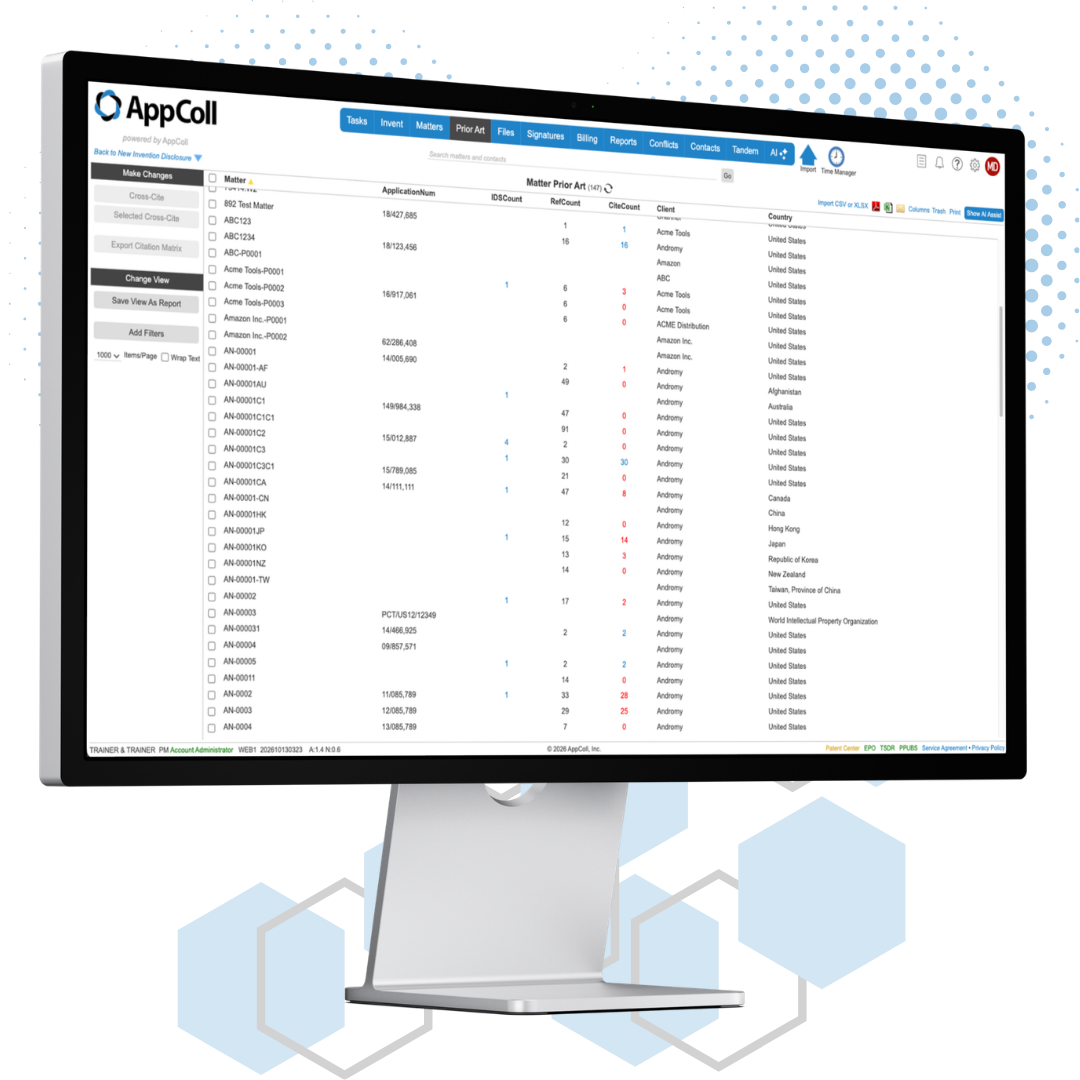
From a single screen you can see all your patents, how many IDS forms have been generated per application, how many references have been cited in an IDS form and how many references need to be cited in the future. Anything in red means you have work to do.
02
Matter Prior Art Page
See details of all the prior art references associated with an application from a single screen. Quickly view each reference name, publication date, patentee, whether it has been cited, whether it has been reviewed by the Examiner and more. Attach PDFs of your non-patent literature references. Click on a reference to see other patents associated with it.
03
Add References
Add new references in seconds. Type a patent or publication number and AppColl searches Espacenet and fills in the title, patentee/applicant and publication/issue dates. For published and issued matters, pull in their references with the click of a button.
04
Reference Cross-Citing
With the click of a button you can cross-cite a new reference across all related cases. AppColl automatically updates your view to show which application(s) need an IDS form based on the new reference citations. You can also cross-cite references based on subject matter.
05
Create IDS Forms
Stop wasting time manually filling out IDS Forms. At the click of a button, AppColl populates all the details into the SB08A form. Easily create dozens of forms in minutes. AppColl can save you hours of wasted time.
Citation status at a glance
Set the citation status of one reference or many at once. Whether a reference was cited and whether the Examiner considered it are tracked separately.
Not yet cited
References linked to a matter count as needing citation until they are cited in an IDS or by the Examiner.
Previously cited
Mark references that were cited in an IDS filed outside AppColl, with the date of that IDS.
Cited by Examiner
Record references the Examiner cited, with the cite date, and track which ones the Examiner has considered.
Citation not required
Keep a reference linked to a matter while removing it from the Cite Count.
More prior art tools
Citation matrix
Download a citation matrix for a matter family to verify which references have been cited in which matters.
Non-patent literature
Add NPL references with a description, original and translated documents, and links to the source.
Remove duplicate NPL
Find duplicate NPL references automatically or by hand, and point every matter to the copy you keep.
Link references in bulk
Select many references in the All References view and link them to a matter, or copy them from one matter to another, in one step.