
Billing
Time, invoices and payments, connected to your matters
The AppColl® Billing Module is a comprehensive billing, invoicing, and accounting system designed specifically for Intellectual Property professionals. It empowers law firms to track time, generate client invoices effortlessly, and manage payments with ease.
Fully integrated with other AppColl modules, the Billing Module eliminates the hassle of transferring data between systems or using disparate tools with different interfaces. Import invoices seamlessly and synchronize data with QuickBooks for streamlined operations.
Billing tasks can be added manually or tracked using AppColl's built-in timer, allowing users to clock specific tasks in real time. Create customized invoices tailored to your needs, with the flexibility to adjust the level of detail to match client preferences. Easily preview invoices, make real-time edits, and finalize them with a single click. AppColl generates both a PDF invoice and a LEDES-compliant electronic billing file, supporting both 1998b and 2.0 formats for clients who require them.
Additionally, generate unlimited billing reports to analyze key metrics such as billed amounts, collections, aging, and billing efficiency. The AppColl Billing Module delivers everything you need to simplify and optimize your billing workflow.
From time entry to payment
1
Capture time
Start, pause and stop timers from the Time Manager on any page. Create a billing item when you complete a task or send an email, or generate one automatically when a task changes status.
2
Build invoices
Generate invoices for multiple clients at once. Choose and rearrange invoice sections, and AppColl remembers the settings you last used for each client.
3
Deliver
Every save produces a PDF plus LEDES 1998B and 2.0 files. Email the invoice to your client from the invoice page, or bulk download PDFs and LEDES files as one zip.
4
Get paid
Apply payments from new funds or from a retainer balance. With QuickBooks Online connected, add a payment link to invoices and import payments back into AppColl.
Billing Module Features
Billing Item Types
Create individual billing items for flat fees, hourly fees, expenses, adjustments, write-offs, retainers, client payments, percentage discounts and more. Easily defer invoicing of a particular item to a later invoice.
Electronic Invoicing
AppColl can generate LEDES electronic invoices for your clients. Our LEDES files meet the 1998b and 2.0 formats.
Customizable Billing Rates
Set default and client-specific hourly rates for each timekeeper. Maybe your normal billing rate is $350, but you bill one client at $325 and another at $275. AppColl will automatically bill each client at the rate set within the system. Easily override the default rate as needed.
Fee and Expense Caps
Place fee and expense caps on individual matters or tasks. If you exceed the cap, AppColl will automatically adjust an invoice to deduct the overage.
Billing Reports
Generate billing reports for clients, partners, paralegals, human resources and more. Choose from 20+ display items and filters for creating custom reports in seconds. Create reports as PDF documents, CSV files or send them as emails.
Invoice Summaries
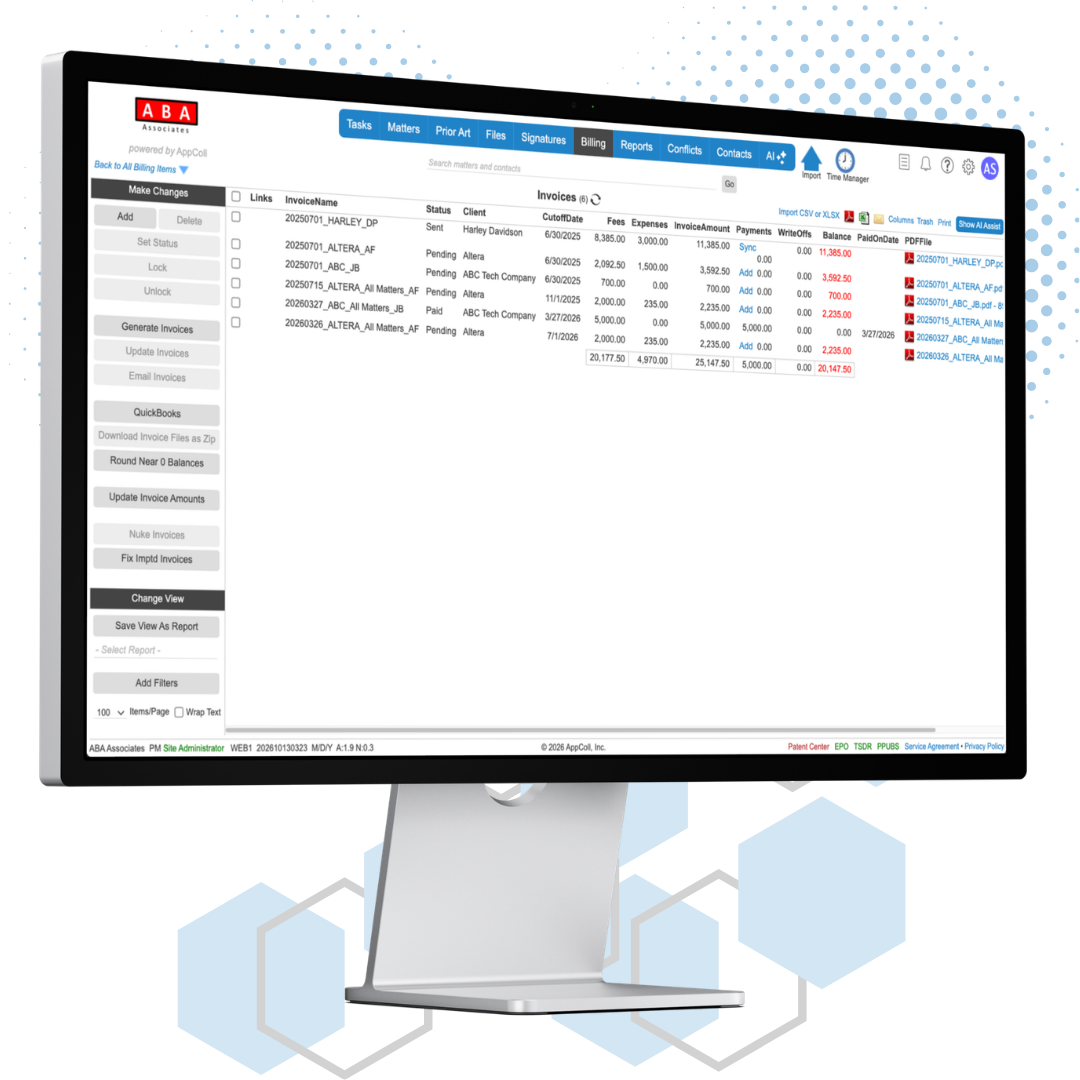
See all your invoices in a single screen summary view. Sort by data fields such as client, status, date and amounts due. Quickly see how much money your clients still owe.
Billing Timers
AppColl provides a Timer button at the top of every page. Start and stop multiple timers associated with multiple billing items. Pause one timer and start the next without missing a single billable minute.
Invoices
Point and click to create professional looking invoices in seconds. Show as much or as little information as you want, such as matter summary, timekeeper summary, past due amounts, billing against retainer amounts and adjustments. AppColl allows you to specify many details in your invoice such as percentile discounts and tax rates.
Retainers
Enter retainers received from a client and bill individual matters or invoices against them. Invoices can display the retainer payments. Overpayments are automatically turned into a retainer. Send invoices requesting a retainer.

QuickBooks® Online Integration
Have a QuickBooks Online account? Quickly and efficiently sync your AppColl invoices with QuickBooks Online.
Send invoices to QuickBooks
Select invoices on the Manage Invoices page and send them in one step.
Import payments
Pull payments recorded in QuickBooks onto any linked AppColl invoice.
Sync client contacts
Send AppColl clients to QuickBooks, or import QuickBooks customers as AppColl client contacts.
Payment link on invoices
Add a QuickBooks payment link to your AppColl invoices so clients can pay online.
More billing tools
Billing item templates
Save standard flat fees and expenses as templates. AppColl can also create templates for every item in the USPTO Fee Schedule.
Discounts, credits, taxes and write-offs
Discount all fees by a percentage or a single item, issue credit invoices, mark items taxable, and write off all or part of an invoice.
Trust account reports
PM PlusReconcile bank balances against retainer debits and credits, with a bank account recorded on each retainer.
Billing profit and origination credits
Split an hourly rate between the timekeeper and the firm, and credit attorneys with a percentage of collections from clients they bring in.
Split flat fees
Merge fee items from multiple timekeepers into one flat fee line on the invoice, manually or automatically by task.
Configurable LEDES files
Customize field mappings and timekeeper classifications, and add invoice descriptions globally or by matter.
Invoice controls
Lock invoices from editing, keep every prior PDF revision, and rename invoice terms to match your firm's language.
Import your data
Bring in billing items, billing codes and billing item templates from spreadsheets.