
Contacts
Everyone you work with, connected to your matters
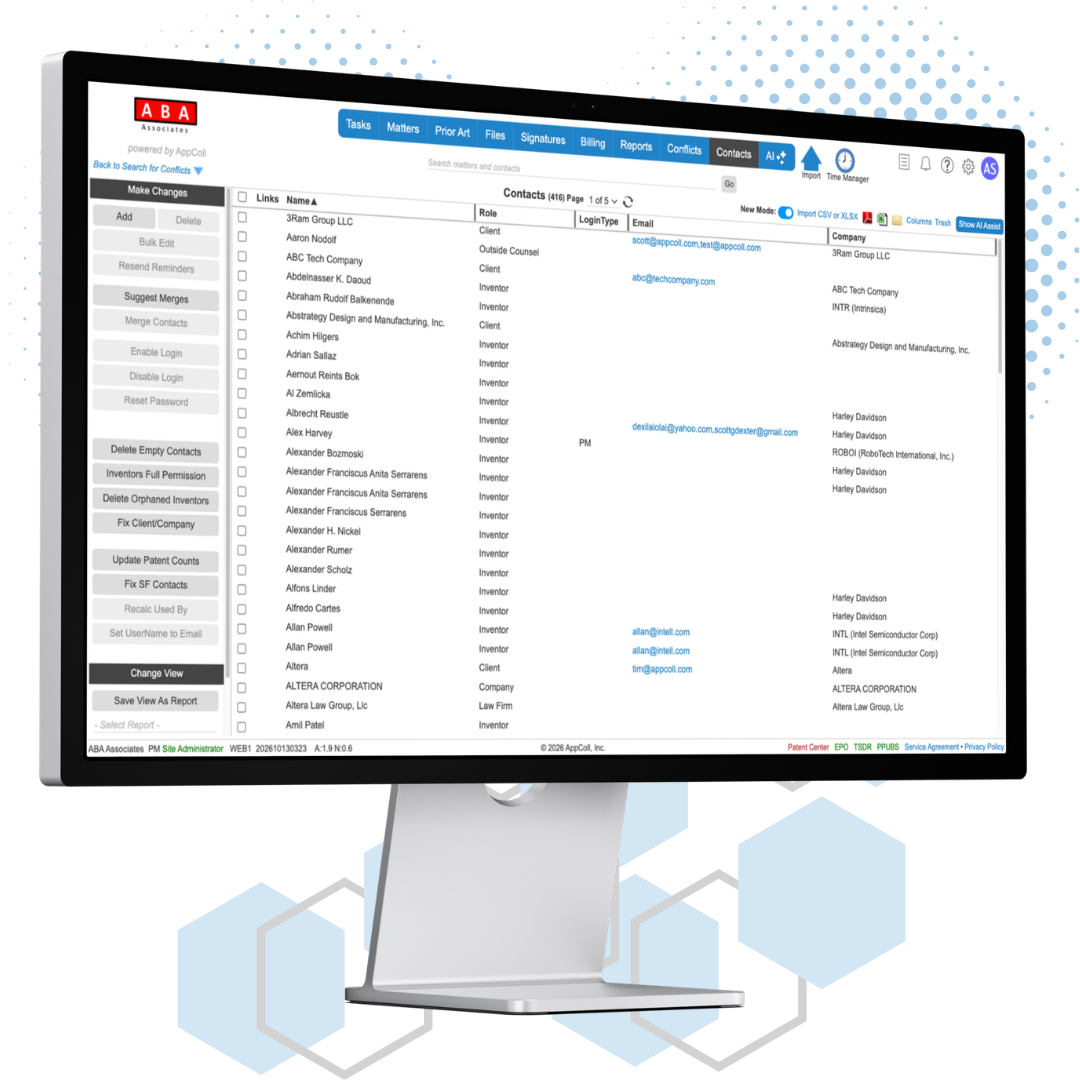
AppColl® Contacts module provides access to all your contacts. A summary view provides a complete list of all your contacts with dozens of filters to refine your view to just the ones you wish to see. Choose from dozens of displayable data fields for each contact.
Clicking on a contact record provides all the information for a contact. Each contact record has a role such as attorney, law firm, company, inventor, foreign associate, outside counsel, etc. Easily set access permissions for each user. Allows superusers to see everything and some to only see the matters they are working on. See all patent applications for each inventor. Assign default billing rates to your employees. Track USPTO registration numbers, USPTO customer numbers and deposit account numbers. The information in the contacts module can populate many USPTO forms. For example, address and citizenship for your inventor contact records can auto-populate into ADS forms.
You can easily import your current contact database into AppColl. We can handle Outlook/Gmail/Apple Mail list or HR database feeds.
Ways to add contacts
01
Add manually
Pick a role and fill in the fields for that role. Use Save & Add to enter several records in a row.
02
Import a spreadsheet
Upload a CSV or XLSX file. The only required fields are a role and a name or company.
03
Inventors from your matters
When matters are populated from Patent Center or Espacenet, AppColl creates a contact record for each inventor automatically.
04
QuickBooks® Online
Import QuickBooks customers as AppColl client contacts.
Contacts Module Features
Contact Summary View
View your entire contact database from a single screen. See contacts by role, billing rates, employee ID, manager, department, USPTO information, inventor awards, searchable keywords, # applications filed, # issued patents, citizenship and more. Customize the visible information with 60+ data fields per contact.
Contact Details View
View and edit the complete details of a contact from a single screen. Each contact type, such as Patent Attorney or Client, has a distinct set of fields associated with it. You only see the fields appropriate for each role.
Flexible Permissions
Each contact has 30+ permission parameters. You can assign View, Modify, Add, and Delete permissions for each of AppColl's seven modules. Easily restrict user's visibility to only matters and billing information associated with them.
Merge Contacts
Databases get cluttered and duplicate contacts are inevitable. Through advanced algorithms, AppColl can easily suggest which contacts may be duplicates of one another. A life saver when you have 10,000+ inventors.
Roles and access
A contact's role sets its fields and where it can be used in a matter. Logins and permissions decide what each user can see and change.
20+ contact roles
From Client and Inventor to Foreign Associate, Paralegal and Patent Agent. AppColl Support can add roles your firm needs.
Roles that fit the matter
Roles control where a contact can be assigned. An inventor cannot be set as the attorney on a matter.
Restricted Access
Limit a user to a specified set of matters and the information related to them.
Enable and disable logins
Administrators turn logins on or off with one click. New users receive their login details by email. A disabled user's contact record stays in AppColl.
More contact tools
Contact aliases
Store alternate spellings of a name. AppColl checks aliases when it searches for a contact.
Mass update
Export filtered contacts, edit them in Excel and import the changes back. Records are matched by Contact ID.
Search and filters
The search bar on every page finds matters and contacts together. Filter contacts the same way you filter matters, tasks and billing items.
Default attorney
Set a default attorney on a client's contact record.
Law firm records for invoicing
Your law firm contact record fills the Remit To section of your invoices.
Protected records
Contacts linked to matters, tasks, billing items or invoices cannot be deleted, so an inventor is never dropped from an application by mistake.